Bass EQ and Compression
The bass guitar is often the backbone of a track, providing the rhythmic foundation and supporting the harmonic structure of the song. To make sure your bass cuts through the mix and delivers the right energy, getting the EQ and compression settings right is essential. Both EQ and compression are key to sculpting the bass guitar’s tone, helping it sit perfectly in the mix without overwhelming other instruments.
In this blog post, we’ll break down how to approach EQ and compression for bass guitar, covering the fundamentals and offering tips to achieve a tight, punchy sound that fits any genre.
EQ for Bass Guitar: Shaping the Tone
EQ is one of the most important tools for adjusting the bass guitar’s frequency spectrum. The goal is to ensure the bass doesn’t clash with other elements like the kick drum, while still retaining a full, rich sound that drives the track forward.
1. High-Pass Filter (HPF) – Remove Subsonic Mud
Start by applying a high-pass filter to the bass guitar track. The low-end frequencies below 30-40 Hz are typically unnecessary and can make your mix sound muddy. These frequencies don’t contribute to the musicality of the bass but can take up valuable headroom.
Where to set the HPF:
- 30-40 Hz for electric bass: Most bass guitars don't produce useful sound below 30 Hz. Setting your HPF here will clean up the low end without sacrificing any of the bass guitar’s punch.
2. Low End (20-100 Hz) – Add Warmth and Weight
The fundamental frequencies of the bass guitar fall in the 40-100 Hz range, and this is where you want to focus when adding weight and warmth. If your bass sounds thin or lacks depth, you can add a slight boost here.
Where to boost:
- 50-80 Hz for added punch and weight: A small boost in this range can help your bass sound fuller, giving it more presence in the mix.
- Be careful not to overdo it. Too much boost in this range can make your mix feel too boomy or create clashes with the kick drum.
3. Midrange (100-500 Hz) – Cut for Clarity
The midrange is where the bass guitar’s body and presence are felt. However, too much midrange can make your bass sound boxy or crowded, especially in a dense mix.
Where to cut:
- 200-350 Hz: This range can make the bass sound muddy or overly boomy. Cutting gently here can help clean up the tone, giving more space for other instruments like guitars and vocals.
- A small cut of 2-4 dB in this area can tighten up your bass, especially if the mix is getting crowded.
4. Upper Midrange (500 Hz – 1.5 kHz) – Add Presence
The upper midrange can add the definition and clarity necessary for the bass to cut through the mix. If your bass sounds lost or doesn't stand out, boosting this range will help it sit better alongside other instruments.
Where to boost:
- 800 Hz – 1 kHz: A subtle boost in this range can make the bass more present in the mix without sounding harsh. It helps the bass cut through the mix, especially in denser arrangements where the bass needs to be heard clearly.
5. High End (2-5 kHz) – Add Definition and Harmonics
The higher frequencies (above 2 kHz) help bring out the attack and definition of the bass, which is especially important if you want to hear the pluck of the strings or the finger-slap tone.
Where to boost:
- 2-4 kHz: A slight boost here can enhance the attack of the bass guitar. However, be careful not to overdo it, as it can cause unwanted harshness and fatigue.
Where to cut:
- You may want to cut anything above 6-7 kHz if the bass is sounding too bright or sharp.
Quick Guide
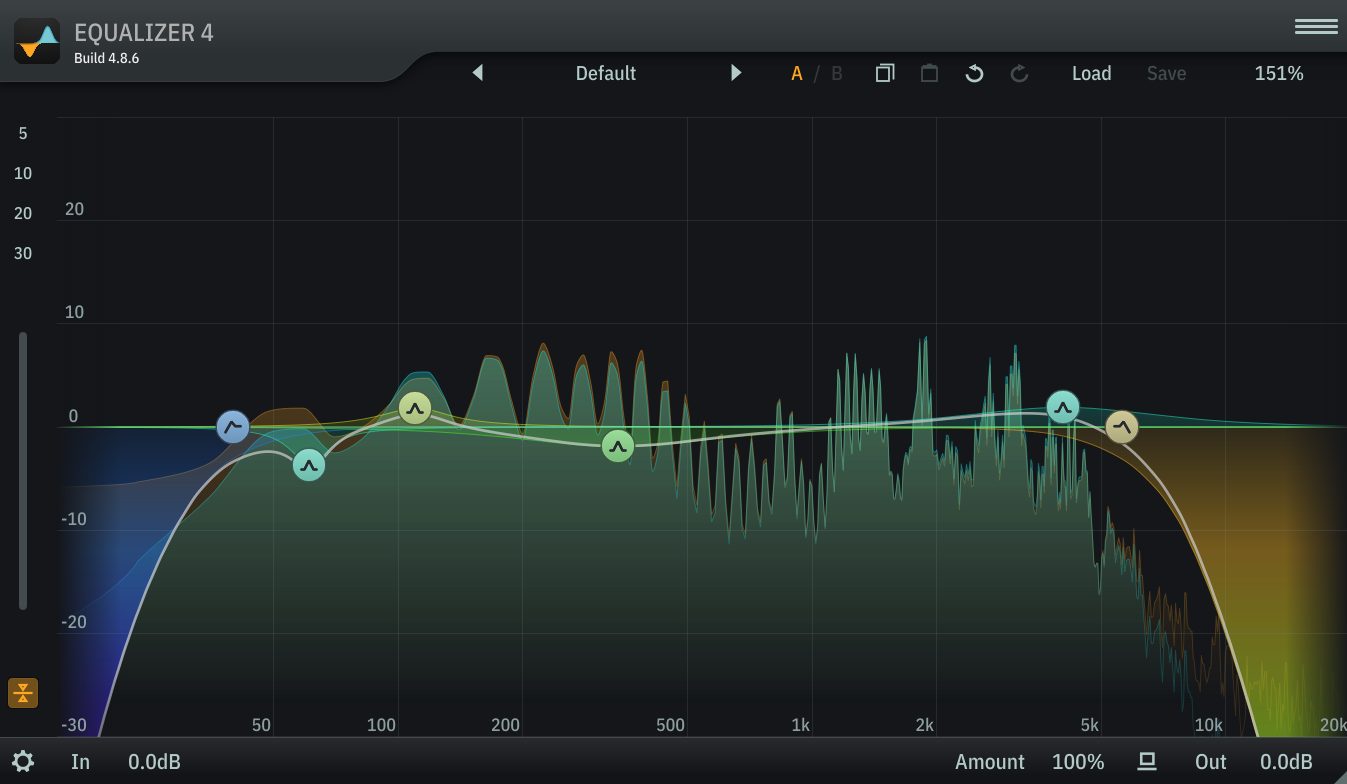
| Frequency | Recommendation |
|---|---|
| 50Hz | High Pass |
| 50-100Hz | Notch Out around Kick Drum |
| 100-130Hz | Boost |
| 350Hz | Cut |
| 4000Hz | Boost |
| 5500Hz+ | Low Pass |
Compression for Bass Guitar: Controlling Dynamics
Compression is essential for ensuring the bass guitar sits consistently in the mix, providing a steady and controlled foundation. Without compression, the bass may be uneven, with some notes overpowering others or disappearing entirely.
1. Setting the Threshold
The threshold determines the point at which the compressor starts to engage. For bass guitar, you want to ensure that the compressor is catching the louder, more dynamic parts of the performance, without affecting the natural attack too much.
Where to set the threshold:
- Set the threshold so that the compressor only activates on the louder parts of the signal. For most bass guitars, a threshold around -10 to -5 dB works well. You want to compress the peaks without squeezing the life out of the entire performance.
2. Ratio: How Much Compression?
The ratio controls how much compression is applied once the threshold is exceeded. A higher ratio means more compression, and a lower ratio means less. For bass, you typically want a moderate ratio to keep the dynamics under control.
Where to set the ratio:
- 3:1 to 5:1: This is a good starting point for bass. It’s enough to control peaks and prevent the bass from becoming too loud or too quiet but still allows the bass to breathe.
For a more aggressive style, like slap bass, you may opt for a higher ratio (e.g., 6:1 to 8:1), but for most situations, 3:1 to 5:1 works well.
3. Attack and Release: Timing the Compression
-
Attack: The attack setting determines how quickly the compressor reacts to a signal that exceeds the threshold. For bass, you generally want a slightly slower attack time to preserve the transient attack of each note, so the bass retains its punch and definition.
-
Attack time: Set it to 10-30 ms for a nice, punchy bass that still allows the transients to come through.
-
Release: The release setting determines how quickly the compressor returns to normal after the signal drops below the threshold. For bass, a medium release time ensures that the compressor doesn’t pump too much, and the bass remains consistent in volume.
-
Release time: Set it to around 50-100 ms for smooth, natural release behavior.
4. Make-Up Gain: Bringing the Level Back
After compression, the level of the bass will likely be reduced, so you’ll need to use the make-up gain to bring it back to the desired volume. This helps ensure that the bass is still loud enough to be heard in the mix.
How to set the make-up gain:
- Adjust the make-up gain until the bass is sitting comfortably in the mix, ensuring it’s not too quiet compared to other instruments. Don’t be afraid to raise it by 2-4 dB or more depending on how much compression you've applied.
Final Tips for EQ and Compression on Bass
- Use EQ and compression together: While EQ shapes the bass’s tone, compression controls its dynamics. Both are necessary for ensuring that the bass sits well in the mix.
- Be gentle with EQ boosts: Don’t overdo the EQ boosts, especially in the low end. It’s better to cut unwanted frequencies than to add too much, which can lead to a muddy or boomy mix.
- Try parallel compression: If you want a more natural sound with plenty of punch, try parallel compression—blend the compressed bass with the dry signal for added presence and control without sacrificing dynamics.
- Trust your ears: These settings are a guideline, but every bass is different. Listen to how your EQ and compression affect the sound and tweak them accordingly.
Quick Guide
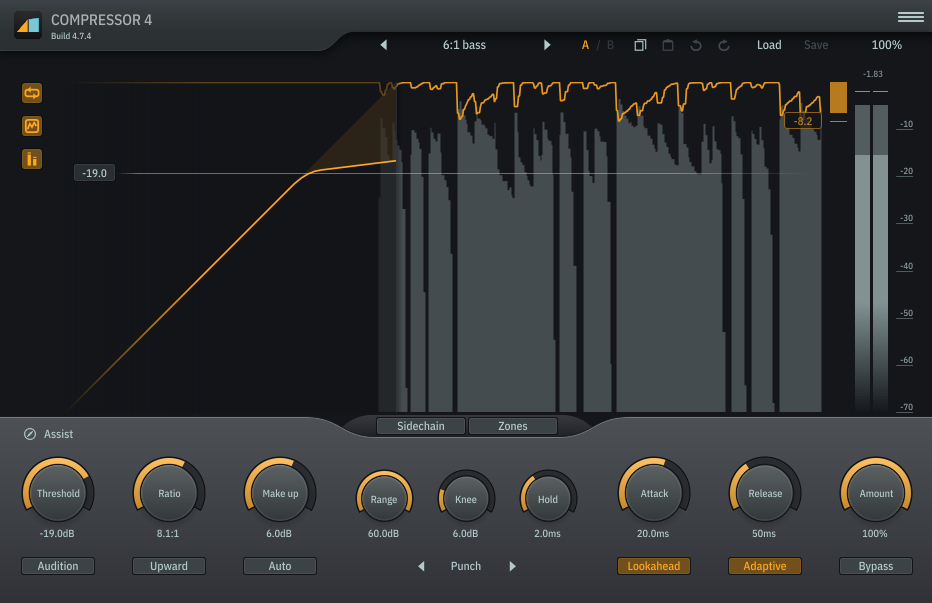
| Value | Setting |
|---|---|
| -9dB | Threshold |
| 8:1 | Ratio |
| 20ms | Attack |
| 50ms | Release |
| 6dB | Knee |
| Match Input | Make-Up |
Conclusion
Getting the right EQ and compression settings for bass guitar can make a huge difference in how it sits in the mix. With EQ, focus on clearing up unnecessary low-end mud, enhancing presence and weight, and ensuring the bass doesn’t compete with the kick drum. When it comes to compression, aim to control dynamics, tighten up the performance, and preserve the bass’s punch and attack.
With the right EQ and compression in place, your bass guitar will not only sound tight and punchy but also have the necessary depth and clarity to support the rest of your mix.
Spectre Digital's singluarity and IK Multimedia's MODO BASS 2