PeakEater

When it comes to mixing and mastering, every detail counts. From the first instrument to the final touches, each element in your effects chain plays a crucial role in shaping your sound.
But no matter how carefully crafted your chain is, there’s always the potential for peaks, distortion, and unwanted clipping at the final stage. That’s where PeakEater comes in.
Developed by vvvar, PeakEater is a free, open-source plugin designed to address one of the most common issues in the world of digital audio production: controlling unwanted peaks without compromising the quality of your sound. This versatile plugin is a must-have for anyone who’s serious about their final mix, and it works particularly well when placed at the end of your effects chain.
Let’s dive into why PeakEater is such a game-changer and how it can be an essential tool for mixing, mastering, and sound design.
What is PeakEater?
At its core, PeakEater is a dynamic processor aimed at eliminating peaks that can occur in the final stages of your effects chain. Unlike typical limiters or compressors, which tend to focus on smoothing out dynamic range or controlling overall volume levels, PeakEater is specifically designed to handle the peak excursions that can cause clipping or distortion when the signal gets too loud.
Think of PeakEater as a highly specialized tool that can “eat” unwanted peaks without sacrificing the integrity of your sound. Its job is simple yet incredibly effective: it keeps things from getting too loud at the very end of the processing chain, while ensuring that the rest of your sound remains intact and unprocessed.
Why Place PeakEater at the End of Your Effects Chain?
While dynamic processors like compressors or limiters are often placed earlier in the chain to shape the overall dynamics of the sound, PeakEater shines brightest when placed at the end of the chain—just before your audio is sent out of your DAW, to the master bus, or to a final output.
Here’s why:
-
Prevents Clipping If you’ve used multiple effects like EQ, reverb, saturation, or distortion, these can sometimes boost your signal’s peaks unexpectedly, causing it to clip. Placing PeakEater at the end of your chain ensures that any spikes in volume are automatically handled before they reach the point of distortion or clipping.
-
Preserves Sound Quality One of the most frustrating aspects of peak limiting is that it can often dull the overall sound or introduce artifacts. Many limiters and compressors apply aggressive processing, which can reduce transients or result in an unnatural sound. PeakEater, however, is designed to eat peaks transparently—meaning it controls those occasional volume spikes without compromising the natural dynamics of your mix.
-
Maximizes Headroom By controlling peaks at the final stage, PeakEater helps maintain clean, unclipped audio while maximizing headroom for your mix. It’s a great way to ensure that you’re not sacrificing the integrity of your sound just to avoid clipping.
-
No Over-Processing Because PeakEater focuses on controlling peaks rather than continuously altering the dynamics of your sound, it’s less likely to over-process your track. Unlike traditional limiters that work on every part of the signal, PeakEater only intervenes when needed, keeping your mix clean and intact.
Features and Benefits of PeakEater
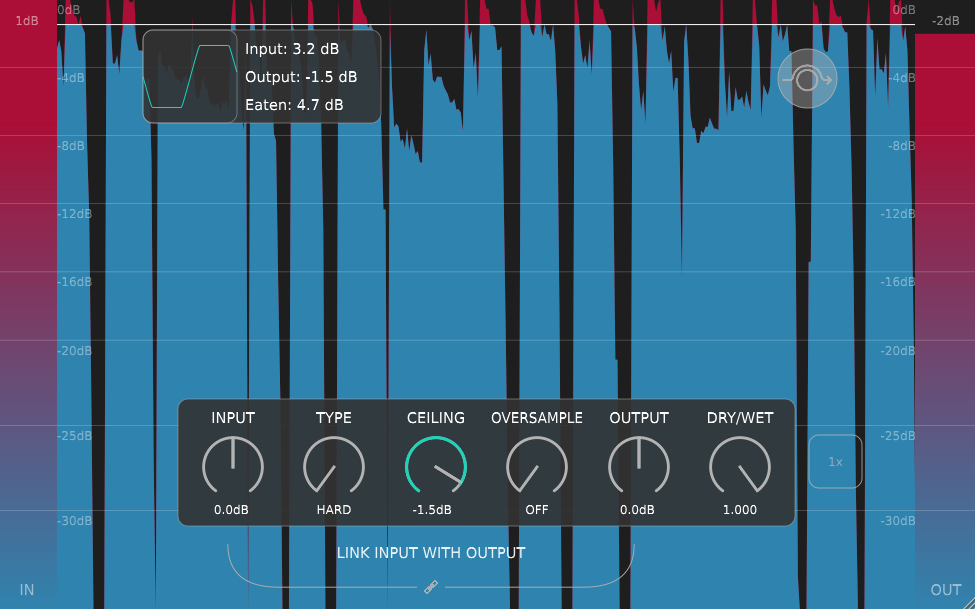
1. Simple, Intuitive Interface One of the standout features of PeakEater is its simplicity. The interface is clean, with easy-to-understand controls that let you get the job done without confusion. The plugin doesn’t overwhelm you with unnecessary settings—it focuses on peak management, so you can keep your workflow fast and efficient.
2. Peak Detection and Control At its core, PeakEater allows you to control peak levels, detecting and reducing them when they exceed a user-defined threshold. You can dial in the amount of reduction you need to avoid clipping while leaving the rest of your signal untouched.
3. No Artifacts or Distortion One of the common pitfalls of peak limiting is that it can often introduce unwanted artifacts or distortion, especially if you're applying a heavy reduction. With PeakEater, you get smooth, transparent peak control with minimal impact on the tonal qualities of your sound. Your dynamics stay intact, and you avoid the harsh side effects that can occur with other limiters.
4. Free and Open-Source One of the best things about PeakEater is that it’s completely free and open-source. You get access to a high-quality, professional plugin without spending a dime. Plus, being open-source means that you can trust it to be actively developed and improved by a community of like-minded creators.
5. Lightweight and Efficient Despite its powerful functionality, PeakEater is lightweight and optimized for low CPU usage. You won’t have to worry about it bogging down your system, making it perfect for both large projects and more modest setups.
How to Use PeakEater in Your Workflow
Using PeakEater is as simple as placing it at the end of your effects chain and letting it do its job. Here's a quick guide to integrating it into your workflow:
-
Insert PeakEater Add PeakEater to the final insert slot of your effects chain. This is usually right before your master bus or final output.
-
Adjust the Threshold Set the threshold to the point where you want the plugin to begin reducing peaks. You can start by setting it slightly below 0 dB to catch any potential clipping.
-
Fine-Tune the Gain Reduction Adjust the amount of gain reduction to suit the needs of your mix. Typically, you won’t need to apply extreme reduction—just enough to prevent clipping. PeakEater will smoothly handle those occasional spikes while preserving the rest of your signal.
-
Monitor the Output Keep an eye on the output levels and ensure that no clipping is happening while your mix retains its clarity. You can use your DAW’s metering tools alongside PeakEater’s to ensure everything is under control.
-
Enjoy the Results That’s it! With PeakEater in place, your audio will stay clean and free of distortion, while your mix maintains its dynamic range and impact.
Where to Download PeakEater
You can grab the PeakEater plugin directly from its GitHub repository. The download is free, and the plugin is available in both Windows and macOS formats, making it accessible to a wide range of users.
Here’s the link to download it: Download PeakEater on GitHub
Conclusion: PeakEater is a Must-Have for Peak Control
If you’ve been struggling with unpredictable peaks or unwanted clipping in your effects chain, PeakEater could be the simple, transparent solution you've been looking for. Its intuitive interface, efficient performance, and free availability make it an invaluable tool for both novice producers and seasoned professionals alike.
When placed at the end of your effects chain, PeakEater ensures that your mix remains pristine, controlled, and free of distortion—without compromising the overall sound. If you haven’t yet added it to your toolkit, do yourself a favor and try it out. It may be the missing piece to achieving the clean, polished sound you’ve been striving for.