ToneLib GFX
If you use Linux and want a powerful, flexible solution for guitar amp and effect simulation — without hauling around real amps or complicated setups — ToneLib GFX deserves a serious look. It’s a full-featured amp-and-effects modeling suite that runs natively on Linux (as well as Windows and macOS), meaning you can plug in your guitar straight into an interface and get realistic amp tones and effects in software.
What is ToneLib GFX — and why it works well on Linux
ToneLib GFX is more than just a few amp sims: it’s a complete “virtual studio” for guitar (and bass), combining amplifiers, cabinets, stompboxes/rack-style effects — along with utilities such as a tuner, built-in looper/recorder, backing-track player and metronome.
It ships as a standalone application and as a VST/VST3 plugin — so you can run it by itself for practice or jam sessions, or inside a DAW when recording or mixing. Importantly for Linux users: ToneLib GFX supports native Linux builds (on x86-64), not just via Windows emulation.
Updated recently (v4.5.1 and later), with improved performance (DSP optimizations, better oversampling filters), enhanced stability, better Linux-specific fixes — which makes it more dependable on a Linux production rig than many older plugins.
Features & Tone-Shaping Power
ToneLib GFX offers a large palette of simulated gear to build your tone from scratch or to simply pick presets and play:
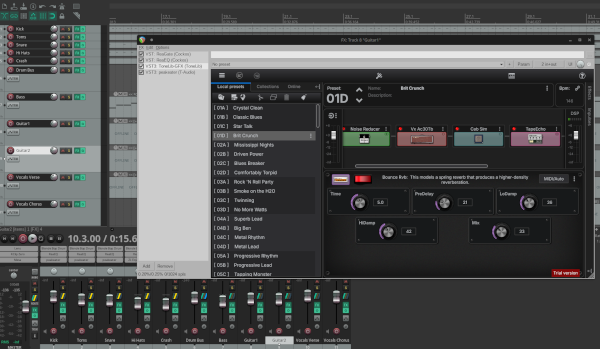
Amplifiers & cabs: dozens of amp models covering everything from clean and vintage tones to modern high-gain. Cabinets are matched with cab simulation (IR-style), with mic placement control to fine-tune guitar tone. Effects chain: overdrive, distortion, modulation, delay, reverb, compressors, and more — letting you build custom chains, add ambience, dynamics or polish. Cab sims and IR support: ability to load external impulse responses boosts flexibility — you can craft or match real-world cab tones for more realistic sound.
Preset management & built-in workflow tools: tone preset browser, built-in recorder, backing-track player, tuner, looper: all useful for practice, songwriting or quick sketches without needing a full DAW.
Performance efficiency: ToneLib is designed to be lightweight on CPU, so you can run several instances without taxing your system — ideal for Linux rigs where performance headroom matters.
Many users report that the clean tones are clear and natural, and that driven / overdriven tones are surprisingly convincing for a software sim. One reviewer wrote that the sound “smokes” competing amp-sim plugins: warmer, cleaner, less harsh than some alternatives.
Why ToneLib GFX is a Great Option Especially on Linux
Native Linux support: Unlike many amp-sims which require Windows or macOS — or a complicated wine-based workaround — ToneLib GFX provides a native Linux build, with recent updates focused on maintaining compatibility and stability under Linux audio systems.
Standalone or DAW-friendly: You can use it as a simple standalone tool for practice/jamming, or as a VST plugin in a Linux DAW when recording — flexibility often missing in Linux-only tools.
Full “amp + effects + tools” package: Built-in tuner, looper, backing-tracks, cab sims, external IR support — everything you need to record, practise, or perform without external hardware.
Good performance on modest hardware: People have used ToneLib GFX on modest Linux setups (e.g. older i5 + 8 GB RAM) with low latency and stable performance, even with multiple instances running.
Affordable vs hardware alternatives: Compared with buying amps, pedals, cabs, mic rigs etc., ToneLib provides a vast sonic palette without needing physical gear — a big plus if you want a flexible rig at modest cost.
What to Watch Out For & How It Compares
Of course, no software sim is perfect:
Some users note that top-end, ultra-realistic “boutique amp” nuance may still lag behind high-end hardware — and for some genres (very high-gain metal, extreme ambience) you might prefer a traditional rig or a dedicated high-end modeller.
While many users are satisfied with the sound quality, “real feel” under the fingers may differ from real amps — especially for dynamics, response and physical interaction.
As with any modelling, good results benefit from careful cab-sim/IR setup, proper input gain staging, and ideally decent audio interface / latency configuration.
That said — for most players, hobbyists, home-recording guitarists or anyone on Linux — ToneLib GFX offers a superb balance of convenience, versatility, and tone shaping power.
Who Should Use ToneLib GFX
ToneLib GFX is a great fit for:
- Linux users who want a native amp-sim + effects solution without relying on Windows/macOS or Wine hacks.
- Bedroom or home-studio guitarists/bassists — for practice, songwriting, recording, jam sessions, demos.
- Musicians needing a flexible, all-in-one solution — you get amps + cabs + effects + tools (tuner, looper, backing tracks), so you don’t need separate software/hardware.
- People on a budget — instead of buying amps and pedals, ToneLib gives access to many amp types and effects for a fraction of the cost.
- Anyone experimenting with tone design or needing fast change of sounds — easy to try different amp models, cab sims, effects combinations, or swap presets quickly.
Conclusion
If you play guitar or bass on Linux and want a complete, flexible, and efficient virtual rig — from clean tones to high-gain, ambient leads or heavy crunch — ToneLib GFX delivers. Its combination of native Linux support, amp and effect modelling, cab simulations, built-in practice & recording tools, low CPU load and streamlined interface makes it one of the best options out there for Linux guitarists.