How to Add VST3 Plugins in REAPER on Linux

Adding VST3 plugins to REAPER on Linux is thankfully simple—especially if you stick to native Linux plugins, which avoid the complexity of Wine, Yabridge, and Windows bridging layers. Native plugins install cleanly, behave consistently, and integrate with REAPER just like they should. In this guide, I’ll walk you through the entire process step-by-step: installing the plugin, configuring REAPER’s scan paths, rescanning your plugin database, and troubleshooting common issues.
Step 1: Install Your Plugin
I'll always and only use native Linux VST3 Plugins, trying to work with Wine and Yabridge just is't worth the pain and hassle in my opinion. Most native Linux plugins come as .vst3 folders in a .tar.gz or .zip.
You simply copy the folder into:
~/.vst3/
If the folder doesn’t exist, create it:
mkdir ~/.vst3
Step 2: Tell REAPER Where Your VST3 Plugins Are
Open REAPER, Go to Options -> Preferences
In the left sidebar, go to Plugins -> VST
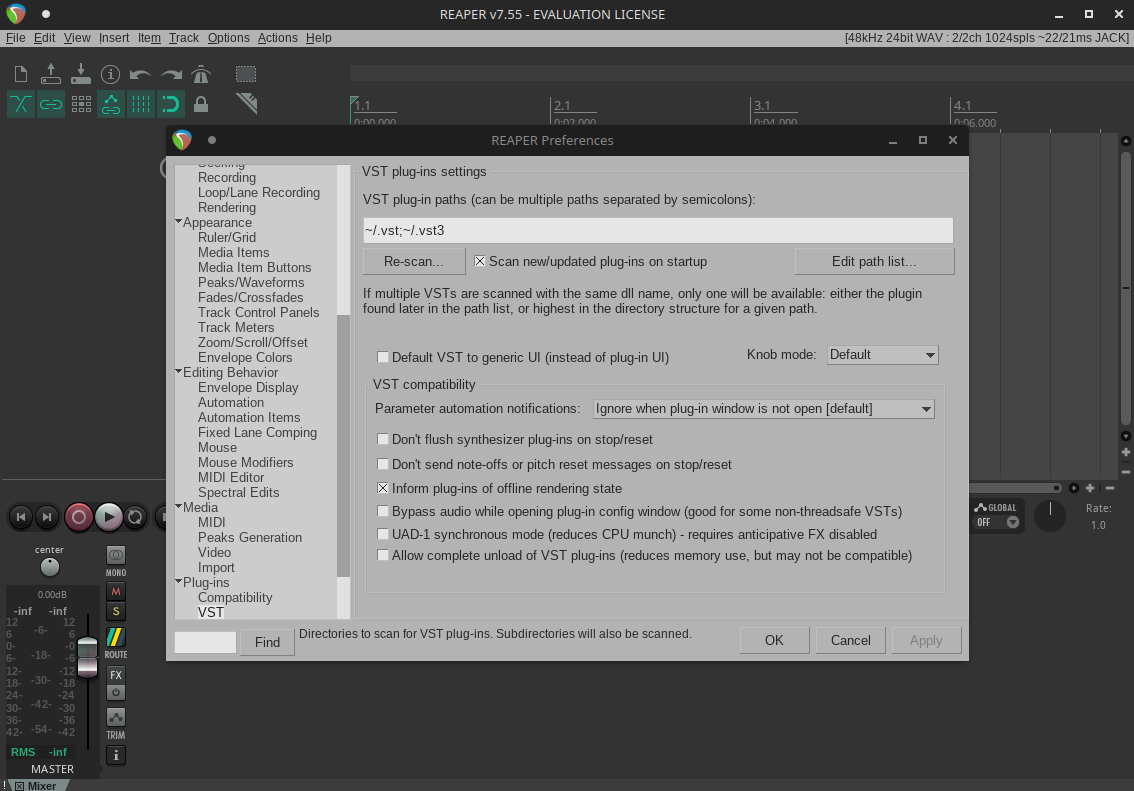
Look at VST plug-in paths
For Linux, REAPER should include:
/usr/lib/vst3
/usr/local/lib/vst3
/home/yourusername/.vst3
If paths aren’t listed, you can add them manually using the Add button.
Step 3: Clear Cache & Rescan
This is the most important step.
Still in Preferences -> VST
Click Clear cache/re-scan
REAPER will rescan all your plugin directories and detect everything new.
Step 4: Load Your Plugin
Create or select a track, Click the FX button and search for your plugin name in the FX browser, double-click to load it.
Troubleshooting VST3 Plugins on Linux
- Plugin folder must end in .vst3
Native VST3 plugins are actually folders, not files. Example:
MyPlugin.vst3/
If the folder is renamed or missing .vst3, REAPER won’t detect it.
- Correct file permissions
Sometimes permissions cause VST3 plugins to be unreadable.
Fix them with:
chmod -R 755 ~/.vst3
- Wrong architecture
REAPER on Linux is usually 64-bit, 32-bit plugins (rare on Linux) won’t load.
Conclusion
Adding VST3 plugins in REAPER on Linux is quick and reliable once your plugin folders and scan paths are set up correctly. After placing your .vst3 folder in the right directory and performing a rescan, your new plugin should appear instantly and be ready for use.